


1. 前言
基本所有的vps商家,都会提供免费的Linux系统供安装,如CentOS、Debian、Ubuntu等。那为什么还要使用一键DD脚本重装/更换系统呢?
原因大概有这么几点:
商家提供的系统版本有限,可能没有自己需要的版本(如HostHatch只有CentOS只有7,Debian只有9、10);
商家提供的系统大多都是改装过的,不纯净(如良心云、套路云服务器自带云镜、云盾等监控),可能存在软件兼容行问题;
商家提供的系统大多带有监控,虽说可以卸载,但是心里总是有疙瘩(指良心云、套路云);
针对以上几种情况,一键DD脚本就可以为服务器更换一个纯净的系统,帮你解决问题。下面我们就来尝试一下
2. 重要提醒
请仔细阅读服务器商家的ToS条款,事先确认你的服务器提供商是否支持你DD系统(重装自己的系统)
由于授权问题,很多服务器提供商是禁止你把服务器DD成windows系统的(比如Contabo),发现会暂停服务甚至删鸡!
OpenVZ / LXC 架构系统不适用此脚本
注意重装有风险,请妥善备份好自己的数据,(阿里腾讯搬瓦工等有快照的商家,你可以先在后台存一个快照)可能导致无法开机(部分商家可以用VNC救回来,但本文不涉及),谨慎操作!
3. 一键重装Linux系统
下列脚本支持系统重置为 Debian: 9、10, 11;Ubuntu: 18.04、20.04;CentOS: 6.10
注意重装有风险,可能导致无法开机,谨慎操作!
注意重装有风险,可能导致无法开机,谨慎操作!
注意重装有风险,可能导致无法开机,谨慎操作!
准备工作
使用脚本前最好先安装如下软件:
一台你系统不喜欢的VPS
脚本
DD 成 Debian 10
bash <(wget --no-check-certificate -qO- 'https://raw.githubusercontent.com/MoeClub/Note/master/InstallNET.sh') -d 10 -v 64 -p "自定义root密码" -port "自定义<a href="https://www.iigeek.com/archives/tag/ssh"><b style="color:#378e3c">ssh</b></a>端口"DD 成 Ubuntu 20.04
bash <(wget --no-check-certificate -qO- 'https://raw.githubusercontent.com/MoeClub/Note/master/InstallNET.sh') -u 20.04 -v 64 -p "自定义root密码" -port "自定义ssh端口"MoeClub 脚本
重点推荐:
时间:22/11/2021 15:21 萌咖更新脚本:
新增对 Oracle AMD,Oracle ARM 全面支持。可支持从 Ubuntu, Oracle Linux 等系统网络重装。
更新 dd 镜像的基础系统版本。
移除对外部 wget 的依赖。
新增 -port 参数,可更改默认 SSH 端口。
更新 内置的网络参数计算 逻辑。
更新 grub 配置文件定位逻辑,可支持任意引导 grub 的系统.
以下系统已通过测试 (其他自测): Debian: 9, 10, 11; Ubuntu: 18.04, 20.04; CentOS: 6.10; 以下平台已通过测试 (其他自测): Oracle、Do、Azure
bash <(wget --no-check-certificate -qO- 'https://raw.githubusercontent.com/MoeClub/Note/master/InstallNET.sh') -d 10 -v 64 -p "自定义root密码" -port "自定义ssh端口"-d 10 -v 64
-d 9 -v 64
-u 20.04 -v 64
-u 18.04 -v 64
演示
下面是我以腾讯云的1H1G预装Debian11的服务器作为演示的例子,来实际操作一下。
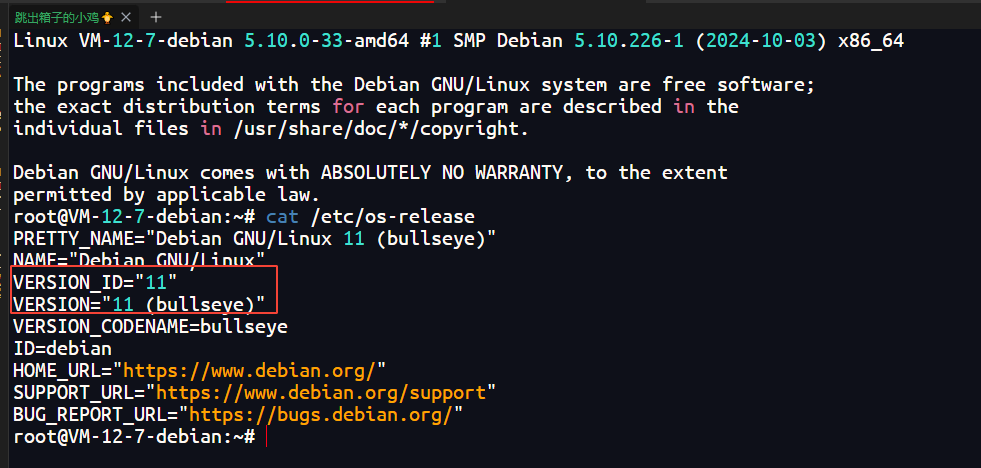
完成准备工作之后,输入上方的脚本:

大概等了15~30分钟左右,再次连接,登陆成功!输入cat /etc/os-release查看版本
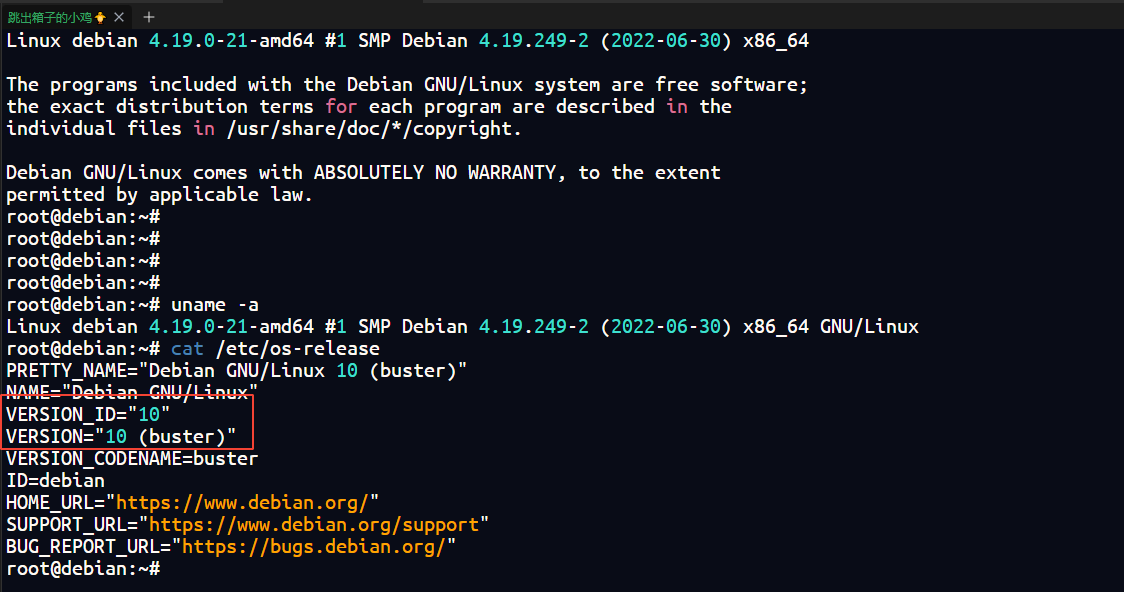
好啦,至此愉快地玩耍啦。
4. 常用脚本
综合工具箱(强烈推荐,集成了很多脚本)
wget -O box.sh https://raw.githubusercontent.com/BlueSkyXN/SKY-BOX/main/box.sh && chmod +x box.sh && clear && ./box.sh
测试相关
杜甫测试
wget -q https://github.com/Aniverse/A/raw/i/a && bash a
sudo apt update
sudo apt install python3-prettytable -y
bash <(wget -qO- git.io/ceshi) -j
机器测试
基本测试
请出秋水的 bench.sh 脚本,这个脚本可以查看 Linux 系统信息,还可以测试网络带宽及硬盘读写速率。
wget -qO- bench.sh | bash
GeekBench
GB6 跑分脚本,附带宽测试:
curl -sL yabs.sh | bash
GB6 剔除带宽测试,因为都是国外节点测试,国内跑没多大意义:
curl -sL yabs.sh | bash -s -- -i
GB5 跑分脚本,附带宽测试:
curl -sL yabs.sh | bash -5
GB5 剔除带宽测试:
curl -sL yabs.sh | bash -s -- -i -5
来源:https://github.com/masonr/yet-another-bench-script
单线程测试
bash <(curl -Lso- https://bench.im/hyperspeed)
最全测速脚本
国内测速:
bash <(curl -sL res.yserver.ink/taier.sh)
curl -fsL https://ilemonra.in/LemonBenchIntl | bash -s fast
superbench
wget -qO- git.io/superbench.sh | bash
Bench.sh
wget -qO- bench.sh | bash
速度测试
显示延迟、抖动
bash <(wget -qO- https://bench.im/hyperspeed)
直接显示回程线路
curl https://raw.githubusercontent.com/zhucaidan/mtr_trace/main/mtr_trace.sh|bash
wget -q route.f2k.pub -O route && bash route
# 第一个
wget https://raw.githubusercontent.com/nanqinlang-script/testrace/master/testrace.sh
bash testrace.sh

# 第二个
wget -qO- git.io/besttrace | bash
四网测速
wget -O jcnf.sh https://raw.githubusercontent.com/Netflixxp/jcnfbesttrace/main/jcnf.sh

bash jcnf.sh
三网测速
bash <(curl -Lso- https://git.io/superspeed_uxh)
带快速四网测试版本:
bash <(curl -Lso- https://dl.233.mba/d/sh/speedtest.sh)
bash <(curl -Lso- https://git.io/J1SEh)
测试25端口是否开放
telnet smtp.aol.com 25
测试IPv4优先还是IPv6优先
curl ip.p3terx.com
流媒体测试
全媒体测试
bash <(curl -L -s https://raw.githubusercontent.com/lmc999/RegionRestrictionCheck/main/check.sh)
奈飞测试
wget -O nf https://github.com/sjlleo/netflix-verify/releases/download/2.5/nf_2.5_linux_amd64 && chmod +x nf && clear && ./nf
#第一个
bash <(curl -L -s https://raw.githubusercontent.com/lmc999/RegionRestrictionCheck/main/check.sh)

# 第二个
bash <(curl -sSL "https://github.com/CoiaPrant/MediaUnlock_Test/raw/main/check.sh")
WARP
wget -N --no-check-certificate https://cdn.jsdelivr.net/gh/YG-tsj/CFWarp-Pro/multi.sh && chmod +x multi.sh && ./multi.sh
之后进入脚本快捷方式为 bash multi.sh
服务器时间
CentOS 同步时间
yum -y install ntpdate
timedatectl set-timezone Asia/Shanghai
ntpdate ntp1.aliyun.com
BBR
CentOS 7 BBR
wget -N --no-check-certificate "https://raw.githubusercontent.com/chiakge/Linux-NetSpeed/master/tcp.sh" && chmod +x tcp.sh && ./tcp.sh
一键开启BBR
注意:需要Linux Kernel 内核升级到 4.9 及以上版本可以实现 BBR 加速
uname -srm
输出结果:
Linux 3.10.0-957.12.2.el7.x86_64 x86_64
3 - 内核版本.
10 - 主修订版本.
0-957 - 次要修订版本.
12 - 补丁版本.
一般来说,Ubuntu18.04以上就可以(默认的内核4.15)
echo "net.core.default_qdisc=fq" >> /etc/sysctl.conf
echo "net.ipv4.tcp_congestion_control=bbr" >> /etc/sysctl.conf

sysctl -p

sysctl net.ipv4.tcp_available_congestion_control

lsmod | grep bbr
Docker相关
更新、安装必备软件
apt-get update && apt-get install -y wget vim
海外服务器
非大陆Docker安装
wget -qO- get.docker.com | bash
卸载Docker
sudo apt-get purge docker-ce docker-ce-cli containerd.io
sudo rm -rf /var/lib/docker
sudo rm -rf /var/lib/containerd
非大陆Docker-compose安装
其实现在安装了docker,默认就会安装新版的docker compose,运行命令为:
docker compose,相比旧版docker-compose,少了-, 安装完docker之后可以在命令行输入docker compose --version查看docker compose的版本
旧版docker-compose
sudo curl -L "https://github.com/docker/compose/releases/download/1.29.2/docker-compose-$(uname -s)-$(uname -m)" -o /usr/local/bin/docker-compose
旧版的命令为:docker-compose up -d
sudo chmod +x /usr/local/bin/docker-compose
查看版本
docker-compose --version
大陆服务器
国内机安装docker(如果失效请留言)
大陆服务器安装docker请见:【2024最新】国内的服务器安装并配置Docker
也可以试试这个:
curl -fsSL https://bash.foreverlink.love/dockerinstall.sh | bash -s docker --mirror Aliyun
卸载docker
sudo apt-get remove docker docker-engine
rm -fr /var/lib/docker/
评论区